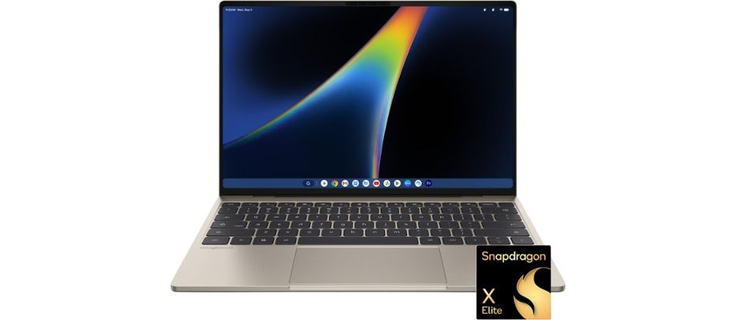
Why Import the Dell XPS Googlebook to Australia?
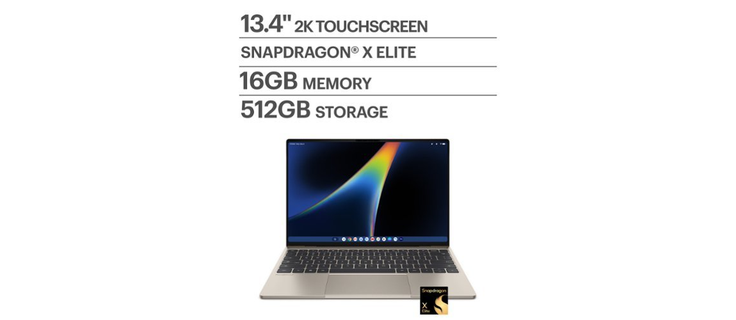
When the Dell XPS Googlebook launched globally, Australia was designated as one of only seven first-wave markets. This recognition means that while local stock is officially available through Google’s Australian shop starting from A$2,399 for the base 16GB/512GB model, availability has been sparse. On launch day, major Australian retailers like JB Hi-Fi, Officeworks, and Dell Australia’s local site showed the device as "Coming Soon" or out of stock. Meanwhile, the United States market has immediate availability at a significantly lower price point of US$999.
For Australian buyers, the price differential is substantial. Even when accounting for international shipping, customs duties, and taxes, importing the US version can save you roughly A$600 to A$700 compared to the local retail price. This makes the import route an attractive option for tech-savvy consumers who want the latest Gemini-first hardware without paying the local premium. Furthermore, since Australia is an eligible country for the 12-month Google AI Pro subscription included with the device, US-imported units can still unlock this benefit, provided the activation terms are met.
It is important to note that this strategy is also viable for buyers in New Zealand, who share similar import thresholds and shipping logistics with Australia. While this guide focuses on Australian regulations, the shipping methods and cost structures are nearly identical for Kiwi buyers looking to import from the US.
Understanding Australian Customs, GST, and Import Duties
Importing electronics into Australia involves navigating the Australian Border Force (ABF) regulations. For the Dell XPS Googlebook, the good news is that portable computers fall under tariff heading 8471.30, which means they are duty-free. You will not pay any customs duty on the laptop itself. However, you will need to pay the 10% Goods and Services Tax (GST).
The critical factor here is the customs value threshold. Australia has a low-value import threshold of A$1,000. Since the US price of the Dell XPS Googlebook is US$999 (approximately A$1,434 at current exchange rates), plus international shipping and insurance, the total customs value will exceed this limit. This means the shipment will require a formal import declaration rather than being processed as a low-value consignment.
Cost Breakdown for Australian Importers
When your package arrives in Australia, you should expect the following charges (note: these are approximate estimates based on current ABF guidelines and may vary slightly):
- Customs Duty: A$0 (Duty-free for laptops)
- GST: 10% of (Customs Value + International Freight + Insurance). On a landed value of ~A$1,600, this is approximately A$160.
- ABF Processing Charge: Approximately A$50 for electronically lodged consignements between A$1,000 and A$10,000.
- Biosecurity Charge: Approximately A$48 for air cargo shipments over A$1,000 (effective from July 2026).
Total estimated border costs: A~158 - A~200. This is in addition to the shipping cost. Unlike low-value imports where GST is collected at checkout, higher-value imports like this often require payment of these fees upon clearance, or they are handled by the courier/broker on your behalf.
AVAILABLE FROM BIG APPLE BUDDY
Dell XPS Googlebook
We buy it in the U.S. and ship it to your door in 75+ countries.
BUY THIS NOW
Shipping Logistics and Delivery Times to Australia
Shipping a laptop from the US to Australia is a routine process for international couriers. The Dell XPS Googlebook contains a lithium-ion battery installed in the equipment (UN3481 classification), which is permitted on air cargo by major express couriers like DHL, FedEx, and UPS. This ensures that your device can travel via the fastest available air routes.
Estimated Delivery Times
Once the order is placed and processed in the US, delivery to Australia typically takes 5 to 10 business days. This timeframe includes:
- US domestic pickup and processing: 1-2 days
- International air freight: 2-4 days
- Australian customs clearance and final mile delivery: 2-4 days
Delays can occasionally occur due to customs inspections or biosecurity checks, which are standard for electronic devices entering Australia. However, because the device is new, sealed, and contains no restricted materials other than the battery, clearance is usually smooth. Buyers in New Zealand should expect similar timelines, as shipments often pass through the same Australian or direct air hubs.
Handling Customs Clearance
Because the shipment value exceeds A$1,000, a formal declaration is required. If you order directly from Best Buy, you may need to provide your Australian Tax File Number (TFN) or ABN for GST purposes, and you might receive a notification from the courier to pay the GST and processing fees before release. Alternatively, using a shopping service like Big Apple Buddy can simplify this process. They act as your US address and handle the initial consolidation and declaration, often streamlining the entry into Australia.
Local Compatibility, Warranty, and Alternatives
Before importing, it is essential to verify that the US model works seamlessly in Australia. Fortunately, the Dell XPS Googlebook is designed for global use.
Power and Chargers
The laptop and its included USB-C charger support 100-240V input, which matches Australia’s 230V supply. You will not need a voltage converter. However, the US charger uses a Type A/B plug, so you will need a simple Type I plug adapter or can use any Australian USB-C PD charger. The keyboard layout is standard US QWERTY, which is identical to the layout used in Australia, so there are no typing adjustments required.
Warranty Considerations
This is the most significant trade-off. The US unit comes with Dell’s US warranty. Dell’s international warranty coverage for the Googlebook line is not explicitly confirmed for cross-border use. If the device fails, you may need to ship it back to the US or deal with Dell US support, which can be cumbersome. In contrast, buying locally from Google Australia or JB Hi-Fi provides warranty support under Australian Consumer Law (ACL), giving you stronger legal rights for repairs and refunds. If peace of mind and local support are your priorities, the A$2,399 local price may be worth the premium.
Local Alternatives
If the import process seems too complex, several other Googlebooks are available locally. The HP Googlebook 14 is stocked at JB Hi-Fi from A$2,299, and the ASUS Googlebook 14 is available from A$2,799. For non-Googlebook options, the MacBook Air M4 and Dell XPS 13 are widely available at all major Australian retailers. However, if you specifically want the Gemini-optimized Dell XPS Googlebook at the best price, importing remains the most cost-effective path.
How to Order via Big Apple Buddy
For many Australian buyers, the most hassle-free way to import the Dell XPS Googlebook is through a trusted shopping service like Big Apple Buddy. This service allows you to shop at US retailers like Best Buy without needing a US address or payment method.
Steps to Order
- Sign Up: Create an account with Big Apple Buddy to get your unique US warehouse address.
- Purchase: Order the Dell XPS Googlebook from Best Buy using your US address. Use a credit card that accepts international transactions.
- Consolidation: Once the item arrives at the US warehouse, you can choose to combine it with other items or ship it directly.
- Shipping to Australia: Select the express air shipping option to Australia. Big Apple Buddy will handle the packaging and prepare the customs documentation.
- Pay Duties: You will receive an invoice for the international shipping, GST, and any applicable customs fees. Pay this online before the package is released in Australia.
- Delivery: Your Dell XPS Googlebook will be delivered to your Australian doorstep within a week of shipping.
By using Big Apple Buddy, you avoid the complexity of dealing with US sales tax (which is not charged on export) and let professionals handle the logistics. This method is particularly popular among Australian tech enthusiasts who want to access US-exclusive deals and early releases.