Introduction: Dell Enters the Googlebook Era
The landscape of personal computing is shifting. Google’s launch of the Googlebook platform marks a significant departure from traditional ChromeOS, creating a new category of devices that blend the simplicity of mobile operating systems with the power of desktop-class hardware. At the forefront of this revolution is the Dell XPS Googlebook, a device that marries Dell’s iconic industrial design with Google’s ambitious AI-driven software ecosystem. For international customers, particularly those in markets like Japan, the UAE, and Singapore, this device represents a premium option for those deeply embedded in the Android and Google ecosystem.
This isn’t just another laptop; it is a statement piece. The XPS Googlebook carries the weight of Dell’s reputation for build quality while introducing a new operating system, Googlebook OS, which is distinct from ChromeOS. It runs on the powerful Qualcomm Snapdragon X Elite processor, ensuring that it can handle demanding tasks while maintaining the battery life users expect from modern ultrabooks. The device is designed for the modern traveler, the student, and the professional who values portability and seamless integration with their smartphone.
While the device has launched primarily in the US and select Western markets, international buyers often face challenges with availability and warranty coverage. For customers in regions where direct retail availability is limited, Big Apple Buddy offers a reliable solution for importing this device, ensuring that global customers can access this innovative hardware without the hassle of complex import procedures. This guide will explore every aspect of the Dell XPS Googlebook, from its stunning display to its AI capabilities, helping you decide if this is the right laptop for your workflow.
Design and Build: The Iconic XPS Aesthetic
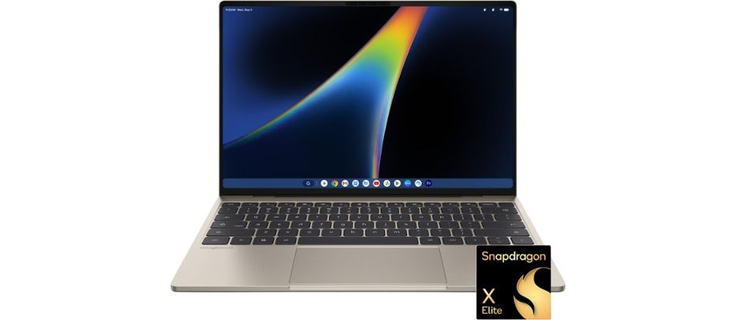
If you have ever used a Dell XPS laptop, the XPS Googlebook will feel instantly familiar. Dell has retained the CNC-machined aluminum chassis that has become synonymous with the XPS line, offering a premium feel that is rare in the Chromebook and Googlebook space. The device features minimal parting lines and a sleek, unibody design that exudes professionalism. The finish, known as 'Shimmer' in the US configuration, provides a natural warmth with a delicate metallic glow, making it visually distinct from the matte finishes common on many competitors.
Portability and Dimensions
One of the standout features of the XPS Googlebook is its physical footprint. Weighing in at just 2.2 lbs (approximately 1 kg) and measuring a slender 12.7mm in thickness, it is one of the thinnest and lightest laptops available in its class. This makes it an ideal companion for frequent travelers, commuters, and students who carry their devices in backpacks or messenger bags daily. The compact 13.4-inch form factor ensures that it fits easily into most laptop bags, unlike the larger 14-inch or 15-inch alternatives from Acer or Lenovo.
The Google Glowbar
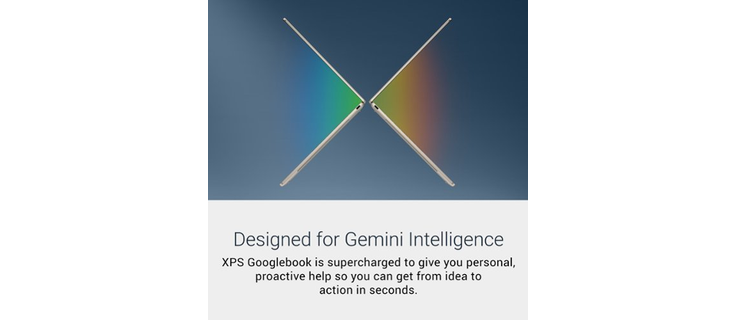
A unique design element that sets the XPS Googlebook apart from traditional XPS models is the Google 'Glowbar' on the lid. This isn't just an LED indicator; it is an animated light strip that comes to life during boot-up, displays battery levels, and illuminates when Gemini Intelligence features are active. This subtle touch of personality reinforces the device's identity as a Google-first product. The keyboard is a backlit chiclet design, and the touchpad is a large glass haptic surface that provides precise tracking and satisfying feedback, matching the premium feel of the chassis.
While the thin chassis necessitates a shallower keyboard travel compared to thicker business laptops, the keys are well-spaced and responsive. For users who type extensively, the tactile experience is good, though perhaps not as deep as you might find on a MacBook Pro or a ThinkPad. However, the trade-off for such a slim profile is a significant one, and for most users, the typing experience is more than adequate for daily tasks.
AVAILABLE FROM BIG APPLE BUDDY
Dell XPS Googlebook
We buy it in the U.S. and ship it to your door in 75+ countries.
BUY THIS NOW
Display and Performance: Visuals and Power
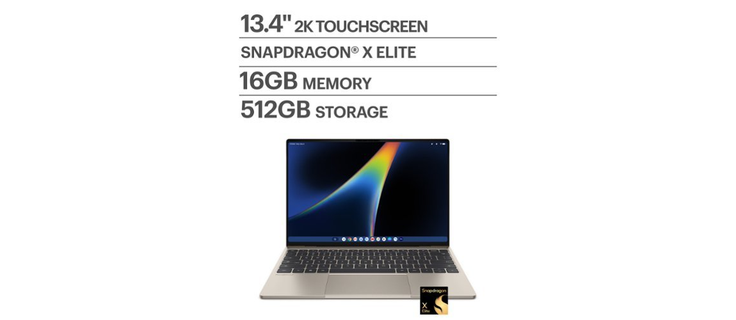
The display on the Dell XPS Googlebook is a major selling point. It features a 13.4-inch 2.5K (2560x1600) InfinityEdge touchscreen with edge-to-edge glass. This resolution provides sharp text and vibrant images, making it suitable for creative work, media consumption, and general productivity. The panel covers 100% of the DCI-P3 color gamut, ensuring accurate color reproduction for photo and video editing. With a brightness of 500 nits, the screen is easily viewable in bright environments, including outdoor cafes or sunlit offices.
Refresh Rate and Eye Care
One of the most impressive technical specifications is the variable refresh rate, which ranges from 30Hz to 120Hz. This allows the system to dynamically adjust the refresh rate based on the content being displayed, saving battery life when static content is shown and providing silky-smooth scrolling and animations when needed. The screen also includes Eyesafe low-blue-light technology, which reduces eye strain during long work sessions, a feature that is increasingly important for remote workers and students.
Processing Power
Under the hood, the XPS Googlebook is powered by the Qualcomm Snapdragon X Elite (X1E-80-100) processor. This is a high-performance ARM-based chip that rivals many Intel Core Ultra processors in terms of speed and efficiency. The chip includes a Hexagon NPU (Neural Processing Unit) rated at up to 45 TOPS (trillion operations per second), which is crucial for running local AI models and accelerating Google's Gemini features. Dell has equipped the laptop with a dual-fan cooling system, ensuring that the chip can maintain peak performance during sustained workloads without overheating.
Memory and storage are handled by 16GB of LPDDR5X RAM and a 512GB SSD. This configuration is sufficient for most users, allowing for smooth multitasking between browser tabs, Android apps, and web applications. For those who need more power, Dell offers configurations with up to 32GB of RAM and 1TB of storage, though these may come at a higher price point and potentially longer wait times for international delivery.
Googlebook OS and Gemini Intelligence: The Software Experience
The most significant differentiator of the Dell XPS Googlebook is its operating system: Googlebook OS. This is not ChromeOS. While it shares some DNA with ChromeOS, Googlebook OS is a new platform designed to combine the native app stack of Android with the multi-window and browser capabilities of Chrome. This means you get the best of both worlds: the vast library of Android apps from the Play Store and the flexibility of a desktop-class browser.
Gemini Intelligence Features
At the heart of Googlebook OS is Gemini Intelligence, Google's advanced AI model. The XPS Googlebook is optimized to leverage this AI for a more intuitive user experience. Key features include:
- Magic Pointer: This feature allows you to wiggle the cursor to summon Gemini. You can then ask the AI to perform tasks, summarize content, or generate images directly from the context of what you are viewing.
- Rambler: A stream-of-consciousness dictation tool that helps you draft emails, documents, and notes using natural language. It understands context and can refine your input in real-time.
- Create My Widget: Using plain language, you can instruct Gemini to build custom desktop widgets for your dashboard, such as weather updates, calendar reminders, or news feeds.
These features are designed to make the laptop feel more like a proactive assistant than a passive tool. For users in the US, UK, Canada, Australia, and select European markets, these features are available at launch. However, international buyers should note that the availability of specific Gemini features may vary by region and language, with some advanced capabilities potentially arriving later or being limited to English initially.
Android Integration
For Android users, the integration is seamless. The XPS Googlebook supports features like Continue On with Android, which allows you to pick up tasks from your phone directly on your laptop. You can cast apps from your phone to the laptop, access files and photos, and sync notifications, passwords, and Wi-Fi settings. This integration requires an Android 17 device for full functionality, making it particularly appealing to users with the latest Samsung Galaxy, Pixel, or other high-end Android phones.
Battery Life, Ports, and Security
Portability is not just about weight; it’s about how long the device can last on a single charge. Dell claims the XPS Googlebook can deliver up to 16 hours of Netflix streaming, while Google’s official shop page suggests up to 18 hours of web browsing. Independent reviews, such as those from Chrome Unboxed, have reported over 14 hours of continuous use, which is an excellent result for a laptop with a 120Hz display and powerful processor. This battery life makes it suitable for long flights, full days of classes, or extended work sessions without needing to hunt for an outlet.
Connectivity
In terms of ports, the XPS Googlebook adheres to the modern standard of USB-C. It features two USB Type-C 3.2 ports (10Gbps), each supporting DisplayPort 1.4 and Power Delivery. This means you can charge the laptop, connect external displays, and transfer data using a single cable type. However, there is no USB-A port and no dedicated headphone jack, so users with older peripherals or headphones may need to use adapters. This is a common trade-off in ultrabooks, but it’s worth noting before purchasing.
Security Features
Security is a top priority for Google, and the XPS Googlebook includes several layers of protection. It features the Google Titan C2 security chip, a dedicated hardware component that protects against physical and software-based attacks. Additionally, the laptop includes a fingerprint reader for quick and secure login, on-device malware detection, and a pKVM-isolated Linux environment for developers. This environment allows programmers to run Linux tools and containers securely, separated from the main operating system.
For international customers, it is important to consider the voltage and charger compatibility. The laptop charges via USB-C Power Delivery, and most modern USB-C chargers are rated for 100-240V, making them compatible with global power standards. However, users traveling to different regions should ensure their charger supports the local voltage and bring a plug adapter if necessary. Warranty coverage is typically regional, so international buyers should verify with their retailer or Big Apple Buddy regarding international warranty support.
Who Should Buy the Dell XPS Googlebook?
The Dell XPS Googlebook is not for everyone. It is a specialized device designed for a specific type of user. Here is a breakdown of who will benefit most from this laptop and who might want to look elsewhere.
Perfect For:
- Android Ecosystem Users: If you use an Android phone, especially a newer model, the integration features make this laptop a powerful extension of your mobile device.
- Students and Remote Workers: The long battery life, lightweight design, and strong web-based productivity tools make it ideal for academic and professional use.
- Travelers: The compact size and durability of the XPS chassis make it a great travel companion.
- Chromebook Upgraders: Users looking to move from a budget Chromebook to a premium device will find the build quality and performance a significant upgrade.
Not Ideal For:
- Windows/macOS Dependent Users: If you rely on specific Windows-only software (like certain CAD programs or specialized enterprise tools) or macOS-exclusive apps, this laptop will not work for you.
- Heavy Gamers: While it supports cloud gaming via the included NVIDIA GeForce NOW trial, it is not designed for running high-end local games.
- Typists Who Need Deep Key Travel: The thin chassis results in a shallower keyboard, which may not be comfortable for all typists.
When compared to competitors like the Acer Googlebook 14 or the ASUS Googlebook 14, the XPS Googlebook stands out for its premium build and compact size, though it may lack the OLED screens found on some rivals. Compared to the MacBook Air, it offers a more affordable entry point into the ARM-based laptop world with better Android integration, though it lacks the macOS ecosystem and universal app support.
For international customers in Japan, the UAE, New Zealand, Singapore, and Saudi Arabia, the XPS Googlebook represents a cutting-edge option for those who want the latest in AI-driven computing. While availability may be limited in these regions, purchasing through a trusted reseller like Big Apple Buddy ensures that you can access this device with peace of mind regarding shipping and potential import duties. Whether you are a student, a professional, or a tech enthusiast, the Dell XPS Googlebook offers a compelling blend of design, performance, and AI innovation that is worth considering for your next laptop upgrade.